Bay Alarm Link: A 2026 walk-through of the app features every manager should know
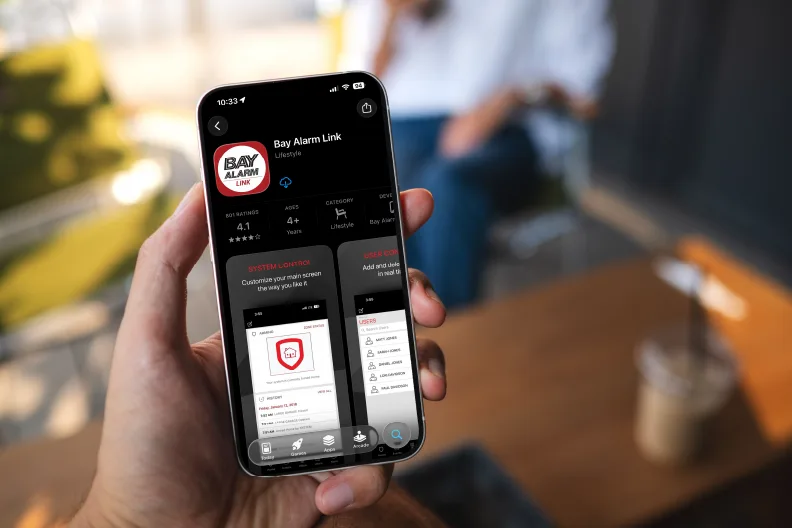
Bay Alarm protects people and property with cutting-edge security technology and expert support. The Bay Alarm link app, a user-friendly mobile tool, allows you to easily access, monitor, and control your security system from anywhere, at any time.
For property managers, overseeing security is a logistical challenge due to large physical areas, multiple access points, and constant foot traffic. In other words, it’s an ideal setting for adopting modern solutions that improve the efficiency and overall effectiveness of a security operation.
Here’s a helpful guide to the Bay Alarm Link app that summarizes its features and offers basic troubleshooting tips.
Curious how secure your property actually is? Find out right now with this fast and free security assessment.
Key Features of the Bay Alarm Link App for Business Managers
The Bay Alarm link app allows instant access and control of a security system from any location.
Features and capabilities include:
- Live video access
- Remote system arming and disarming
- Indoor and outdoor multi-area operation
- Customize and modify zone and sensor settings
- Continuous sensor activity monitoring
- Real-time push notifications for security incidents
- Effortless code management for adding, deleting, and editing user profiles
- Real-time weather for the local zip code
Bay Alarm Link App: Common Troubleshooting and FAQs
Q: What devices is the Bay Alarm Link app compatible with?
A: Bay Alarm Link works on modern smartphones and tablets, specifically Android devices (8.0 or later) and Apple devices (iOS 15.0 or later).
Q: Is Bay Alarm Link a standalone security service?
A: No, in order to use the app, users must have a compatible Bay Alarm control panel and applicable service.
Q: How do I arm and disarm individual areas?
A: First, check your security system’s arm/disarm history status by going to the “Arming screen,” which shows the areas covered by your system. To arm individual areas, move the slider for that area to the right and wait for the display to read “ARMED.” To disarm, move the red “ARMED” slider to the left and wait for the display to read “DISARMED.” Repeat the steps to arm or disarm other specific areas.
Q: How do I arm and disarm all areas at once?
A: To arm and disarm all areas at once with a single tap, go to the “Arming Screen”. You will see two buttons at the top: “ARM ALL” and “DISARM ALL”. To arm all areas simultaneously, tap the “ARM ALL” button and wait for each area’s slider to display “ARMED”. To disarm, tap the “DISARM ALL” button and wait for the sliders to show “DISARMED”. All areas are now disarmed.
Q: How do I add users to the security system?
A: Adding and managing user profiles is easy:
Step 1: Tap the edit icon located in the top left corner of the “Business Center Users” page.
Step 2: Tap the “Add” option.
Step 3: Enter the new user’s name in the “Enter User Name” box.
Step 4: Continue to the “Enter User Code” box and enter the new user’s code.
Step 5: Select the “Profiles” option. Use the slider to choose “Custodian,” “Employees,” or “Manager,” depending on the new user’s job position.
Step 6: Tap “Create App User” to add the new user’s email address. This allows the new user to log into their profile. Tap “Save” in the upper right corner.
Q: What should I do if the Link app won’t open, is slow to connect, freezes, or is not working as expected?
A: If you are experiencing any of the above issues, try these quick fixes:
- Make sure the user credentials you’ve entered are accurate
- Check to ensure a stable internet connection is available
- Close and reopen the Link app
- Restart your mobile device
- Check for software updates and install the newest version if it’s available
What to Do If Your Bay Alarm Link App Isn’t Working (Customer Service)
Need extra help with Bay Alarm Link? Contact our top-rated customer support team for expert assistance at 1-800-470-1000.
Interested in learning more about Bay Alarm’s advanced commercial security solutions? Visit BayAlarm.com or contact a representative today to discuss your needs and get a free quote at 1-800-610-1000.
Start a conversation with a Bay Alarm security expert.
By submitting this form, you agree to receive marketing emails from Bay Alarm. You can unsubscribe at any time.
Related Articles
Bay Alarm has over eighty years of experience protecting businesses and commercial properties with advanced security... Read More >
Imagine arriving at your business on a busy Monday morning, only to find that your fleet... Read More >
Artificial intelligence is enhancing the capabilities of commercial security systems in several ways. One clear example... Read More >
Rapidly evolving technology and shifting risk factors are shaping today’s security landscape. To stay ahead of... Read More >
Process improvement is a strategy businesses use to achieve immediate improvement in a specific workflow or... Read More >
A successful business strives to provide its customers with high-quality products and services while supporting its... Read More >
Everyone loves getting a delivery notification. Maybe it’s a birthday gift, a new pair of shoes,... Read More >
Swiping a key card to enter an office is a standard security measure, but it can... Read More >
We’ve all had that feeling. You walk out to your car late at night, keys clutched... Read More >
Healthcare facilities have a dual responsibility: ensuring patient safety and protecting patient privacy. Video cameras can... Read More >
Every business has expenses—some essential, like rent, and others considered investments, like marketing. But where do... Read More >
A business security system does more than protect your property—it can also save your business valuable... Read More >
Door locks can be traced back to thousands of years ago, making them one of the... Read More >
Preventing copper theft has become a priority for business owners and municipalities nationwide. Enterprising criminals, motivated... Read More >
Controlling access and preventing theft is difficult anywhere, but it’s especially challenging in large, expansive facilities... Read More >
Heavy equipment security is a major concern for construction site supervisors, equipment managers, and business owners... Read More >
Customer: Fortune School Fortune School is a system of 10 tuition-free preschools, college preparatory schools, and... Read More >
From the bustling Gaslamp Quarter to the serene shores of La Jolla, San Diego is full... Read More >
Property managers juggle countless responsibilities, from tenant satisfaction to building maintenance. One of the most critical... Read More >
An outdated commercial security system can make your business more susceptible to evolving criminal threats and... Read More >
Customer: The Classical Academies The Classical Academies is a network of award-winning California Public Charter Schools.... Read More >
Discover how to choose the best commercial access control system for your office. Learn about system... Read More >
Sacramento’s property managers face a unique set of challenges—ranging from wildfire risk and regional crime to... Read More >
Construction sites in Riverside and San Bernardino are hotspots for opportunistic crimes, safety risks, and costly... Read More >
Phoenix businesses face a unique security challenge: safeguarding property, staff, and customers, and withstanding extreme environmental... Read More >
Industry: Warehousing Challenge: Accumulating fees from local government and uncertainty When a business owner in the... Read More >
Orange County is a vibrant hub for a wide range of industries, including tourism, entertainment, and... Read More >
Auto dealerships hold expensive inventory and high-value parts and accessories, making them a prime target for... Read More >
For over four decades, Dr. Shane M. Clary has been a cornerstone of leadership, technical expertise,... Read More >
Agricultural businesses face a variety of security concerns. They have to protect livestock, expensive machinery, and... Read More >
For business owners, preventing theft is a constant concern—whether it’s from shoplifters, burglars, or even opportunistic... Read More >
Preventing theft and inventory shrinkage is crucial for retail and grocery stores already challenged by razor-thin... Read More >
Security guard services offer on-the-ground protection for businesses seeking an additional layer of safety for their... Read More >
The Phoenix metropolitan area continues to experience incredible population growth. With year-round sun, affordable housing, and... Read More >
Office buildings pose a variety of security challenges that businesses must address to safeguard their people,... Read More >
Retail theft is one of the leading causes of business owners’ stress and economic hardships. In... Read More >
Outdoor and remote locations can push traditional surveillance systems to their limits. Fixed systems face challenges... Read More >
Commercial earthquake preparedness is critically important, especially in a city like San Francisco with its long... Read More >
As the backbone of supply chain management, warehouses play a crucial role in storing, managing, and... Read More >
Hospitals face many security challenges, one of which is ensuring proper storage and monitoring of controlled... Read More >
It’s common to think of cybersecurity and physical security as two separate operations. However, in the... Read More >
Door locks can be traced back thousands of years, making them one of the oldest and... Read More >
The recent wildfires in Los Angeles have caused unprecedented damage to homes, businesses, and landmarks, on... Read More >
The holiday season is a time for joy, family, and celebrations—but it’s also a time when... Read More >
In an emergency, every second counts. Whether it’s a threat to a school, bank, store, or... Read More >
With crime on the rise in major cities, the importance of security systems has never been... Read More >
If you live in California, you are no stranger to the challenges of getting insurance. It’s... Read More >
Fire safety is a priority everywhere, but in California it’s especially urgent. To be prepared, business... Read More >
This Saturday, May 4th, the St. Mary’s College (SMC) Men’s Rugby team will face Navy during... Read More >
Protecting educational campuses and facilities is an increasingly urgent and complicated problem. Campus buildings can be... Read More >
Is it time to update your business’s security system, but you’re unsure where to start? We... Read More >
Managing properties, whether one or multiple, means constantly juggling challenges. Dealing with buildings in different cities... Read More >
As security technology advances, so do the options for customizing security protocols. A security protocol tells... Read More >
Live video monitoring is a next-generation security service that combines new technologies in threat detection (way... Read More >
Businesses and people are now using facial recognition technology to make payments, bank online, and as... Read More >
In their research report on “The Future of Physical Security,” execs from Microsoft and Accenture interviewed... Read More >
Customer: Laborers Training School Laborers Training School provides construction-based labor training to union workers in multiple locations... Read More >
As we mentioned in a previous article, several trends in the security market have made live... Read More >
News about artificial intelligence is everywhere these days. So it’s no surprise that business owners are... Read More >
The best runners in the world aren’t simply fast; they’re efficient. The most popular cars don’t... Read More >
What are security GUARD services? Security agent services (SAS) are live security guards who work on... Read More >
What is BOPIS, and why is it appealing to customers and retailers? BOPIS (buy online, pick... Read More >
There’s no denying that AI-powered technology offers you a chance to step up your business’s security... Read More >
You’ve probably heard of behavioral analytics. It’s everywhere these days, shaping our world and dramatically influencing... Read More >
Understanding who is at your business—and when—is a key priority for most business owners. Another obvious,... Read More >
Video security has come a long way, so much so that the full capabilities of a... Read More >
What is live video monitoring? Live video monitoring is a commercial security service that deters crime... Read More >
You can pay your Bay Alarm bill in one of three ways: through our online portal,... Read More >
According to Security Magazine, more than 2,000 first-responder agencies across the US currently use drones and... Read More >
Scaling a business is an exciting time filled with new possibilities. But it can also bring... Read More >
If you’re relatively handy and feel like you have a solid understanding of technology, you might... Read More >
A video security system is only effective if it’s installed properly. The most advanced, AI-based camera... Read More >
Preserving employee safety can be a big challenge when expanding your business to multiple locations. As... Read More >
According to the National Insurance Crime Bureau, more than one million cars were stolen across the... Read More >
Has a speeding car in the next lane ever distracted you from seeing a pothole until... Read More >
Every business owner deals with risk: it’s part of doing business. Some risks are worth taking,... Read More >
An unsafe work environment poses hazards for businesses beyond the physical risks to employees. It can... Read More >
The best modern business security systems feature some of the most advanced technology on the planet.... Read More >
Protecting employees and the office work space takes more than alarm systems and video cameras. A... Read More >
Warehouses are complex environments that present many potential safety hazards to employees. According to the Occupational... Read More >
Protect Your Business Without Breaking the Bank Protecting staff, inventory, and physical property is a priority... Read More >
Security tools work best when they fit the exact needs―and capacity―of your business and staff. The... Read More >
Implementing an effective security system for your business isn’t as simple as installing a camera, setting... Read More >
Following business safety regulations isn’t a choice but an obligation. Ignoring compliance standards not only puts... Read More >
Business leaders know how difficult choosing a security system can be. Every organization has specific needs... Read More >
Securing your business is crucial for longevity and future success. Maintaining a safe work environment goes... Read More >
Researching business security systems can be frustrating and confusing. There are many moving parts, and when you ask for the cost, the answer is usually, “It Read More >
One of the most frequent reasons business owners approach security companies is, unfortunately, one of the... Read More >
Keeping up with trends and technological advancements in the security industry can be challenging. Knowing where... Read More >
Robbery, theft, and arson cost US businesses over $17.2 billion in losses in 2021. As a... Read More >
With the rapid pace of technology, business security systems can become outdated faster than ever. Seeing... Read More >
For businesses concerned about deterring theft, vandalism, and other costly threats to their property and inventory,... Read More >
Waste is kindling for fires. If you work in the waste industry, you are likely aware... Read More >
The numbers don’t lie. Despite all the focus on cybersecurity, cybercriminals remain a costly threat to... Read More >
Company Known for its Security Expertise Offers Tips on How to Prevent Being a Victim. CONCORD,... Read More >
Contact sensors are security devices typically installed on doors and windows. They can notify you and... Read More >
Standard commercial security guard services include agent response, guard patrol, and standing guard, all of which... Read More >
Biometric security systems digitally identify people through biological signatures, like fingerprints, facial recognition, and eye scans.... Read More >
Are you hesitant to get a security and fire alarm system for your business due to... Read More >
Fire alarm systems keep buildings and building occupants safe from fires. While it is easy to... Read More >
Catalytic converter theft has become a big issue for car lots as the price of materials... Read More >
An IP camera, or internet protocol camera, is a type of digital security camera that receives... Read More >
A geofence is a virtual perimeter, or boundary, around a specific, real-world location. A geofence can... Read More >
Despite advanced security technology, false alarms do happen. Non-emergency events are major strains on local emergency... Read More >
CONCORD, CALIF. – Bay Alarm, a seventy-five-year-old family owned and operated security company, doesn’t just protect... Read More >
Video alarm verification pairs your security system with an alarm monitoring center. In the event an... Read More >
A motion sensor, or motion detector, is an electronic device that uses a sensor to detect... Read More >
A fire alarm system is one of the most important security features of any building—they are... Read More >
Traditional metal keys can be easily lost, locks must be professionally re-keyed if an ex-employee fails... Read More >
Modern security camera systems are great for monitoring your home or business, as many systems offer... Read More >
For those looking to increase the safety of their home or business, it can be tempting... Read More >
As a small business owner, you need more than just a security camera or burglar alarm.... Read More >
Constructing a new commercial building—be it a retail space, apartment complex, skyscraper, or sporting arena—is a... Read More >
There are a wide variety of home and business security devices and systems. You can opt... Read More >
Your home or business burglar alarm system increases the safety of everyone and everything within. It’s... Read More >
On Tuesday, July 14, the Contra Costa Board of Supervisors approved Bay Alarm Company’s donation to... Read More >
Many homeowners have adopted home automation technology due to its convenience and security. Z-Wave, one of... Read More >
In 2016, there were over 11,000 reported construction-site equipment thefts in the United States, which accounted... Read More >
St. Mary’s College recently had their Steadauto.com car raffle to benefit their Galloping Gaels Fund and... Read More >
A cyber security breach, or data breach, is an intentional or unintentional release of private information... Read More >
Whether you’re planning a summer vacation for the whole family, or you and your spouse are... Read More >
The coronavirus pandemic (COVID-19) is shifting most day-to-day work operations from the office to the home.... Read More >
Smart home technology includes a vast variety of wirelessly connected devices. When it comes to entertainment... Read More >
With California under shelter-in-place orders and everywhere across the nation practicing social distancing, Santa Clara County... Read More >
The California State Fire Marshal recently announced that it is still essential for contractors to ensure... Read More >
Homeowners occasionally find themselves shopping for a new home security services provider, whether because of dissatisfaction... Read More >
As doorbell cameras become more pervasive, there are also an increasing number of cases in which... Read More >
Fire is one of the top risks to any small business. According to the National Fire Prevention... Read More >
While you can’t always predict supply and demand, ensuring the protection of your business is one... Read More >
With natural disasters being an ever present concern, we wanted to help bring to mind some... Read More >
Smart home devices are growing in popularity, and doorbell cameras are shaping up to be a... Read More >
Is Airbnb safe? Check out these security tips before you list your home on this vacation... Read More >
Now in its 35th year, National Night Out (NNO) was founded in 1984 in a western... Read More >
Bay Alarm is proud to be a title sponsor and partner with the California State Sheriffs... Read More >
April 10, 2019 CONCORD, CALIF. – Bay Alarm continues to grow and expand in Southern California... Read More >
CONCORD, CALIF. – Bay Alarm, the largest independently owned security company in the United States, got... Read More >
CONCORD, CALIF. – Bay Alarm, a family-owned and operated security company dedicated to protecting homes, businesses,... Read More >
Pacheco, CA. April 6, 2016 – Two of Bay Alarm’s leading executives have been inducted into the Security... Read More >
The Contra Costa County Office of the Sheriff operates the Law Enforcement Training Center (LETC)... Read More >